
iOS Builds failing with "unsupported option '-mno-thumb' for target..." in Unity 2019, 2020
There an issue with building for iOS in Unity 2019 and 2020 where XCode fails with exception, “unsupported option ‘-mno-thumb’ for target…”, such as:
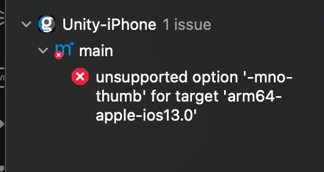
This issue is a Unity->Xcode output bug, described here: https://discussions.unity.com/t/xcode-16-1-build-failing-unsupported-option-mno-thumb-for-target-arm64-apple-ios11-0/1563505/3
To fix the issue:
- Locate the Build Settings:
- Open your project in Xcode.
- Select your project from the Project Navigator (left-hand side).
- Choose the Unity-iPhone target.
- Search for
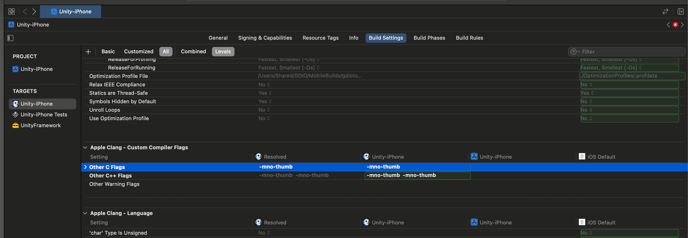
Other C FlagsandOther C++ Flags:-
Go to the Build Settings tab.
-
In the search bar at the top-right, type
Other C Flags. -
Look for the entries under Custom Compiler Flags as shown below.
-
- Edit the Flags:
- Double-click the entry for each configuration (Debug, Release, etc.) where
-mno-thumbappears. - A text input box will appear showing the list of flags.
- Remove
-mno-thumbfrom the list.
- Double-click the entry for each configuration (Debug, Release, etc.) where
- Repeat for
Other C++ Flags:- Perform the same steps for Other C++ Flags.
- Save and Rebuild:
- Save the changes (it updates automatically in Xcode).
- Clean the project (Product > Clean Build Folder or
Cmd+Shift+K). - Rebuild the project.